").attr(n.scriptAttrs||{}).prop({charset:n.scriptCharset,src:n.url}).on("load error",i=function(e){r.remove(),i=null,e&&t("error"===e.type?404:200,e.type)}),C.head.appendChild(r[0])},abort:function(){i&&i()}}});var Jt,Kt=[],Zt=/(=)\?(?=&|$)|\?\?/;ce.ajaxSetup({jsonp:"callback",jsonpCallback:function(){var e=Kt.pop()||ce.expando+"_"+jt.guid++;return this[e]=!0,e}}),ce.ajaxPrefilter("json jsonp",function(e,t,n){var r,i,o,a=!1!==e.jsonp&&(Zt.test(e.url)?"url":"string"==typeof e.data&&0===(e.contentType||"").indexOf("application/x-www-form-urlencoded")&&Zt.test(e.data)&&"data");if(a||"jsonp"===e.dataTypes[0])return r=e.jsonpCallback=v(e.jsonpCallback)?e.jsonpCallback():e.jsonpCallback,a?e[a]=e[a].replace(Zt,"$1"+r):!1!==e.jsonp&&(e.url+=(At.test(e.url)?"&":"?")+e.jsonp+"="+r),e.converters["script json"]=function(){return o||ce.error(r+" was not called"),o[0]},e.dataTypes[0]="json",i=ie[r],ie[r]=function(){o=arguments},n.always(function(){void 0===i?ce(ie).removeProp(r):ie[r]=i,e[r]&&(e.jsonpCallback=t.jsonpCallback,Kt.push(r)),o&&v(i)&&i(o[0]),o=i=void 0}),"script"}),le.createHTMLDocument=((Jt=C.implementation.createHTMLDocument("").body).innerHTML="
",2===Jt.childNodes.length),ce.parseHTML=function(e,t,n){return"string"!=typeof e?[]:("boolean"==typeof t&&(n=t,t=!1),t||(le.createHTMLDocument?((r=(t=C.implementation.createHTMLDocument("")).createElement("base")).href=C.location.href,t.head.appendChild(r)):t=C),o=!n&&[],(i=w.exec(e))?[t.createElement(i[1])]:(i=Ae([e],t,o),o&&o.length&&ce(o).remove(),ce.merge([],i.childNodes)));var r,i,o},ce.fn.load=function(e,t,n){var r,i,o,a=this,s=e.indexOf(" ");return-1").append(ce.parseHTML(e)).find(r):e)}).always(n&&function(e,t){a.each(function(){n.apply(this,o||[e.responseText,t,e])})}),this},ce.expr.pseudos.animated=function(t){return ce.grep(ce.timers,function(e){return t===e.elem}).length},ce.offset={setOffset:function(e,t,n){var r,i,o,a,s,u,l=ce.css(e,"position"),c=ce(e),f={};"static"===l&&(e.style.position="relative"),s=c.offset(),o=ce.css(e,"top"),u=ce.css(e,"left"),("absolute"===l||"fixed"===l)&&-1<(o+u).indexOf("auto")?(a=(r=c.position()).top,i=r.left):(a=parseFloat(o)||0,i=parseFloat(u)||0),v(t)&&(t=t.call(e,n,ce.extend({},s))),null!=t.top&&(f.top=t.top-s.top+a),null!=t.left&&(f.left=t.left-s.left+i),"using"in t?t.using.call(e,f):c.css(f)}},ce.fn.extend({offset:function(t){if(arguments.length)return void 0===t?this:this.each(function(e){ce.offset.setOffset(this,t,e)});var e,n,r=this[0];return r?r.getClientRects().length?(e=r.getBoundingClientRect(),n=r.ownerDocument.defaultView,{top:e.top+n.pageYOffset,left:e.left+n.pageXOffset}):{top:0,left:0}:void 0},position:function(){if(this[0]){var e,t,n,r=this[0],i={top:0,left:0};if("fixed"===ce.css(r,"position"))t=r.getBoundingClientRect();else{t=this.offset(),n=r.ownerDocument,e=r.offsetParent||n.documentElement;while(e&&(e===n.body||e===n.documentElement)&&"static"===ce.css(e,"position"))e=e.parentNode;e&&e!==r&&1===e.nodeType&&((i=ce(e).offset()).top+=ce.css(e,"borderTopWidth",!0),i.left+=ce.css(e,"borderLeftWidth",!0))}return{top:t.top-i.top-ce.css(r,"marginTop",!0),left:t.left-i.left-ce.css(r,"marginLeft",!0)}}},offsetParent:function(){return this.map(function(){var e=this.offsetParent;while(e&&"static"===ce.css(e,"position"))e=e.offsetParent;return e||J})}}),ce.each({scrollLeft:"pageXOffset",scrollTop:"pageYOffset"},function(t,i){var o="pageYOffset"===i;ce.fn[t]=function(e){return M(this,function(e,t,n){var r;if(y(e)?r=e:9===e.nodeType&&(r=e.defaultView),void 0===n)return r?r[i]:e[t];r?r.scrollTo(o?r.pageXOffset:n,o?n:r.pageYOffset):e[t]=n},t,e,arguments.length)}}),ce.each(["top","left"],function(e,n){ce.cssHooks[n]=Ye(le.pixelPosition,function(e,t){if(t)return t=Ge(e,n),_e.test(t)?ce(e).position()[n]+"px":t})}),ce.each({Height:"height",Width:"width"},function(a,s){ce.each({padding:"inner"+a,content:s,"":"outer"+a},function(r,o){ce.fn[o]=function(e,t){var n=arguments.length&&(r||"boolean"!=typeof e),i=r||(!0===e||!0===t?"margin":"border");return M(this,function(e,t,n){var r;return y(e)?0===o.indexOf("outer")?e["inner"+a]:e.document.documentElement["client"+a]:9===e.nodeType?(r=e.documentElement,Math.max(e.body["scroll"+a],r["scroll"+a],e.body["offset"+a],r["offset"+a],r["client"+a])):void 0===n?ce.css(e,t,i):ce.style(e,t,n,i)},s,n?e:void 0,n)}})}),ce.each(["ajaxStart","ajaxStop","ajaxComplete","ajaxError","ajaxSuccess","ajaxSend"],function(e,t){ce.fn[t]=function(e){return this.on(t,e)}}),ce.fn.extend({bind:function(e,t,n){return this.on(e,null,t,n)},unbind:function(e,t){return this.off(e,null,t)},delegate:function(e,t,n,r){return this.on(t,e,n,r)},undelegate:function(e,t,n){return 1===arguments.length?this.off(e,"**"):this.off(t,e||"**",n)},hover:function(e,t){return this.on("mouseenter",e).on("mouseleave",t||e)}}),ce.each("blur focus focusin focusout resize scroll click dblclick mousedown mouseup mousemove mouseover mouseout mouseenter mouseleave change select submit keydown keypress keyup contextmenu".split(" "),function(e,n){ce.fn[n]=function(e,t){return 0
DaramRenamer 2024.7.3
ファイルリネーム
2021/05/04 15:44
説明機能仕様ダウンロード画像使い方
多様なリネーム方法を使用できるファイルリネームツール

複数のファイルの名前を一括変更することができる、Windows 向けのフリーのファイルリネームツール。正規表現を使用してファイル名を変更したり、番号を追加したり、拡張子を変更したり、ファイルの日付やタグ情報をファイル名に追加することができます。

DaramRenamer の概要
DaramRenamer は、ファイル名またはフォルダ名を一括で変更するアプリケーションです。
DaramRenamer の機能
DaramRenamer の主な機能です。
| 機能 |
概要 |
| メイン機能 |
ファイル/フォルダ名を変更 |
| 機能詳細 |
・ファイル名:テキストでファイル名を変更する/正規表現でファイル名を変更する/
正規表現で並べ替える/連結する/ファイル名をトリミングする/ブロックを削除する/削除する/部分的に選択する/大文字または小文字に変換する
・拡張子:拡張子を追加する/自動的に拡張子を追加する/大文字小文字を変換する/拡張子を削除する/拡張子を変更する
・パス:絶対パスにファイルをコピーする/相対パスにファイルをコピーする
・番号:番号を追加する/番号を削除しない/番号の数を増やす/同じ番号を追加する
・日時:ファイルのタイムスタンプ(日付)を追加する/タイムスタンプを削除する
・タグ:ドキュメントタグを追加する/Git 情報を追加する/ハッシュを追加する/メディアタグを追加する |
複数のファイル/フォルダ名を変更できます
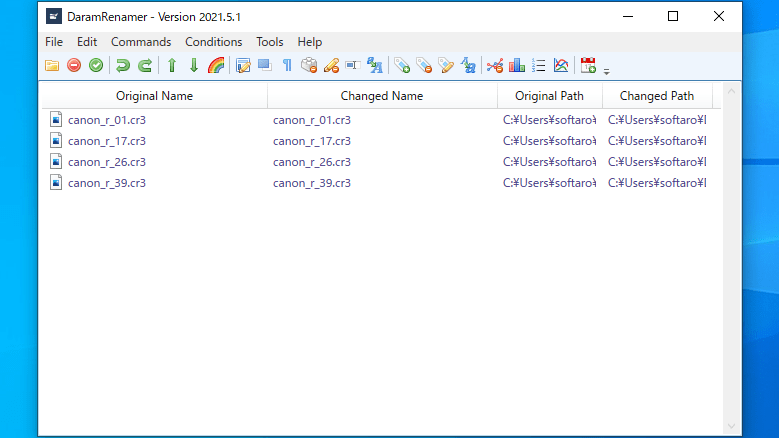
DaramRenamer は、用意されているコマンドを使用して、最小限の操作で任意の数のファイルまたはフォルダの名前を変更することができるアプリケーションです。
単にファイル名の一部を変更したり、正規表現を使用したり、ファイル名の必要な部分を残したり、番号を付けたり、ファイルの更新日時やタグ情報をファイル名に付けたりすることができます。
さまざまなリネーム方法を使用できます
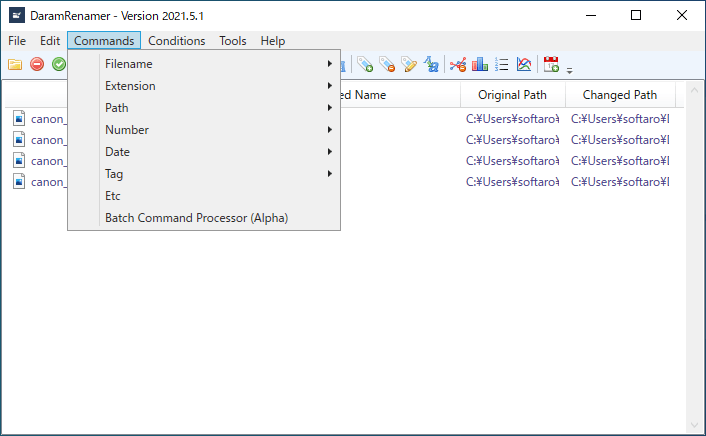
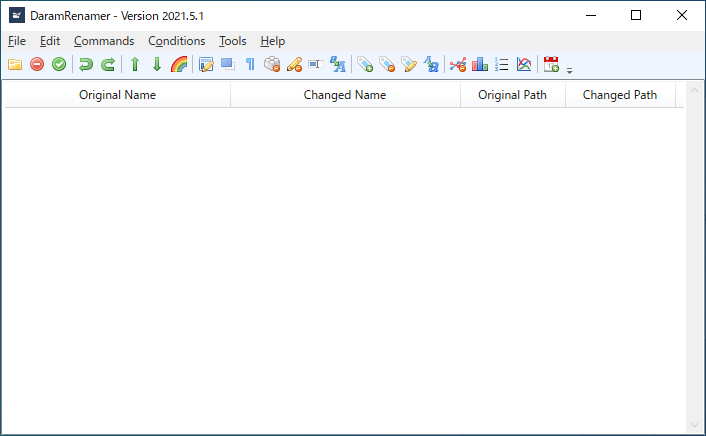
DaramRenamer のインターフェースはシンプルで、メニューを使用したり、よく使われる機能をツールバーから使用することができます。
一度に複数の操作(コマンド)を実行することが可能で、リネーム後のファイル名がプレビューされているので、失敗なくファイルをリネームすることができます。複数のファイル/フォルダを特定の場所にコピーすることも可能です。
かんたんに使用できるファイルリネームツール
DaramRenamer は、ファイル名を置換または連結したり、トリミングしたりすることができるシンプルなファイル名変更ツールです。多様なコマンドを使用して迅速にファイル名を変更できるのが特徴です。
機能
- ファイル/フォルダ名を変更
- 正規表現でファイル名を変更
- 番号の追加
- 拡張子の追加/変更
- 日付の追加
- タグ情報をファイル名に追加
価格:無料
動作環境:Windows 7|8|8.1|10|11
使用言語:英語
最終更新日:
2年前 (2024/07/06)
ダウンロード数:941
画像

ユーザーインターフェース

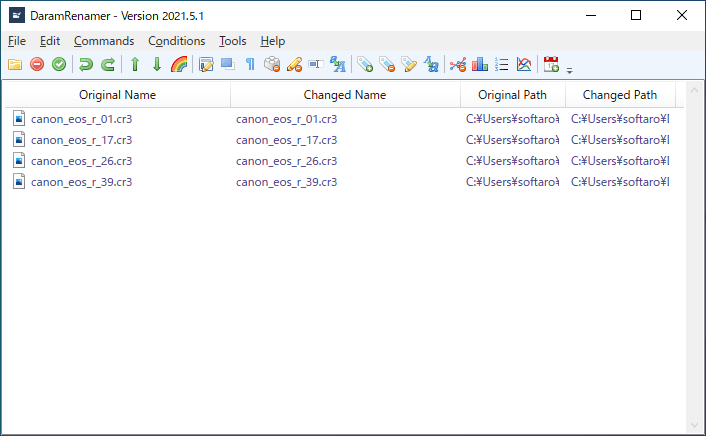
ファイルを追加

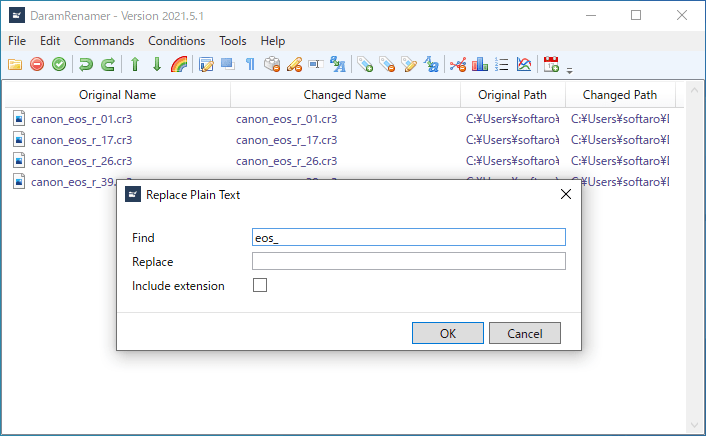
コマンドの選択/リネームの設定
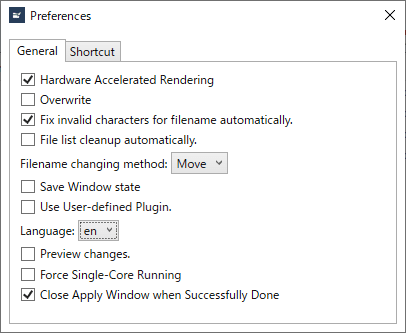
設定画面
使い方
インストール
1.インストール方法
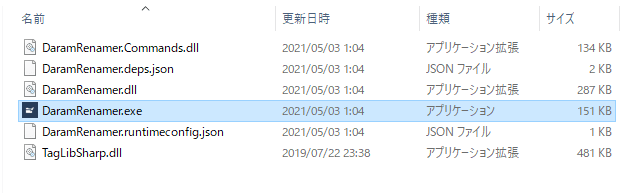
DaramRenamer はインストール不要で使用できます。
- ZIP ファイルを解凍して「DaramRenamer.exe」を実行するとアプリケーションを起動できます。
基本的な使い方
1.ファイル名を一括変更する
- 「File」>「Open file」または「Open folder」をクリックしてファイルまたはフォルダを追加します。

- 「Command」メニューから実行するコマンド(リネーム方法)を選択します。

・Filename:
─ Replace Plain Text:テキストでファイル名を変更する
─ Replace with Regular Expression:正規表現でファイル名を変更する
─ Rearrange with Regular Expression:正規表現で並べ替える
─ Concatenate:連結する
─ Filename Trimming:ファイル名をトリミングする
─ Delete Blocked filename:ブロックを削除する
─ Delete filename:削除する
─ Substring:部分的に選択する
─ Filename Case-cast:大文字または小文字に変換する
・Extension:
─ Add Extension:拡張子を追加する
─ Add Extension automatically:自動的に拡張子を追加する
─ Extension Case-cast:大文字小文字を変換する
─ Delete Extension:拡張子を削除する
─ Change Extension:拡張子を変更する
・Path:
─ Go to Absolute Path:絶対パスにファイルをコピーする
─ Go to Relative path:相対パスにファイルをコピーする
Number:
─ Add Index:番号を追加する
─ Delete no numbers:番号を削除しない
─ Increase Number:番号の数を増やす
─ Numbers to same count:同じ番号を追加する
Date:
─ Add Date:ファイルのタイムスタンプ(日付)を追加する
─ Remove Date:タイムスタンプを削除する
Tag:
─ Add Document Tag:ドキュメントタグを追加する
─ Add Git Information:Git 情報を追加する
─ Add Hash:ハッシュを追加する
─ Add Media Tag:メディアタグを追加する
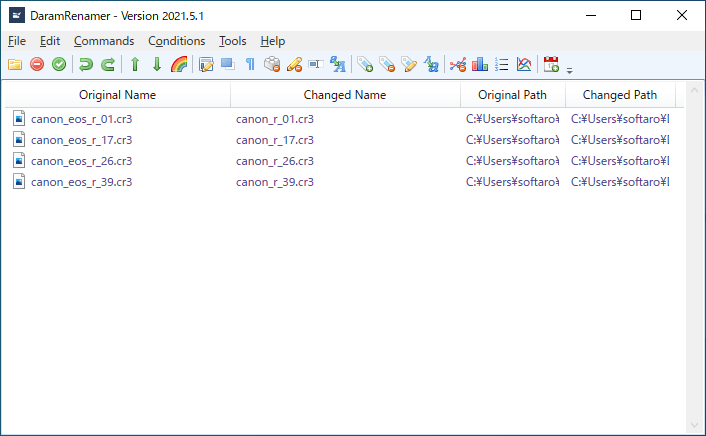
- 例えば、「Replace Plain Text」コマンドを選択した場合は下の画像のウィンドウが表示されます。リネームの設定をして[OK]をクリックします。

- 元のファイル名とリネーム後のファイル名が表示されます。
- ツールバーの「チェック」ボタンをクリックするとリネームが実行されます。
よくある質問と回答
ライセンスについて。
DaramRenamer は、どなたでも無料で使用できます。