").attr(n.scriptAttrs||{}).prop({charset:n.scriptCharset,src:n.url}).on("load error",i=function(e){r.remove(),i=null,e&&t("error"===e.type?404:200,e.type)}),C.head.appendChild(r[0])},abort:function(){i&&i()}}});var Jt,Kt=[],Zt=/(=)\?(?=&|$)|\?\?/;ce.ajaxSetup({jsonp:"callback",jsonpCallback:function(){var e=Kt.pop()||ce.expando+"_"+jt.guid++;return this[e]=!0,e}}),ce.ajaxPrefilter("json jsonp",function(e,t,n){var r,i,o,a=!1!==e.jsonp&&(Zt.test(e.url)?"url":"string"==typeof e.data&&0===(e.contentType||"").indexOf("application/x-www-form-urlencoded")&&Zt.test(e.data)&&"data");if(a||"jsonp"===e.dataTypes[0])return r=e.jsonpCallback=v(e.jsonpCallback)?e.jsonpCallback():e.jsonpCallback,a?e[a]=e[a].replace(Zt,"$1"+r):!1!==e.jsonp&&(e.url+=(At.test(e.url)?"&":"?")+e.jsonp+"="+r),e.converters["script json"]=function(){return o||ce.error(r+" was not called"),o[0]},e.dataTypes[0]="json",i=ie[r],ie[r]=function(){o=arguments},n.always(function(){void 0===i?ce(ie).removeProp(r):ie[r]=i,e[r]&&(e.jsonpCallback=t.jsonpCallback,Kt.push(r)),o&&v(i)&&i(o[0]),o=i=void 0}),"script"}),le.createHTMLDocument=((Jt=C.implementation.createHTMLDocument("").body).innerHTML="
",2===Jt.childNodes.length),ce.parseHTML=function(e,t,n){return"string"!=typeof e?[]:("boolean"==typeof t&&(n=t,t=!1),t||(le.createHTMLDocument?((r=(t=C.implementation.createHTMLDocument("")).createElement("base")).href=C.location.href,t.head.appendChild(r)):t=C),o=!n&&[],(i=w.exec(e))?[t.createElement(i[1])]:(i=Ae([e],t,o),o&&o.length&&ce(o).remove(),ce.merge([],i.childNodes)));var r,i,o},ce.fn.load=function(e,t,n){var r,i,o,a=this,s=e.indexOf(" ");return-1").append(ce.parseHTML(e)).find(r):e)}).always(n&&function(e,t){a.each(function(){n.apply(this,o||[e.responseText,t,e])})}),this},ce.expr.pseudos.animated=function(t){return ce.grep(ce.timers,function(e){return t===e.elem}).length},ce.offset={setOffset:function(e,t,n){var r,i,o,a,s,u,l=ce.css(e,"position"),c=ce(e),f={};"static"===l&&(e.style.position="relative"),s=c.offset(),o=ce.css(e,"top"),u=ce.css(e,"left"),("absolute"===l||"fixed"===l)&&-1<(o+u).indexOf("auto")?(a=(r=c.position()).top,i=r.left):(a=parseFloat(o)||0,i=parseFloat(u)||0),v(t)&&(t=t.call(e,n,ce.extend({},s))),null!=t.top&&(f.top=t.top-s.top+a),null!=t.left&&(f.left=t.left-s.left+i),"using"in t?t.using.call(e,f):c.css(f)}},ce.fn.extend({offset:function(t){if(arguments.length)return void 0===t?this:this.each(function(e){ce.offset.setOffset(this,t,e)});var e,n,r=this[0];return r?r.getClientRects().length?(e=r.getBoundingClientRect(),n=r.ownerDocument.defaultView,{top:e.top+n.pageYOffset,left:e.left+n.pageXOffset}):{top:0,left:0}:void 0},position:function(){if(this[0]){var e,t,n,r=this[0],i={top:0,left:0};if("fixed"===ce.css(r,"position"))t=r.getBoundingClientRect();else{t=this.offset(),n=r.ownerDocument,e=r.offsetParent||n.documentElement;while(e&&(e===n.body||e===n.documentElement)&&"static"===ce.css(e,"position"))e=e.parentNode;e&&e!==r&&1===e.nodeType&&((i=ce(e).offset()).top+=ce.css(e,"borderTopWidth",!0),i.left+=ce.css(e,"borderLeftWidth",!0))}return{top:t.top-i.top-ce.css(r,"marginTop",!0),left:t.left-i.left-ce.css(r,"marginLeft",!0)}}},offsetParent:function(){return this.map(function(){var e=this.offsetParent;while(e&&"static"===ce.css(e,"position"))e=e.offsetParent;return e||J})}}),ce.each({scrollLeft:"pageXOffset",scrollTop:"pageYOffset"},function(t,i){var o="pageYOffset"===i;ce.fn[t]=function(e){return M(this,function(e,t,n){var r;if(y(e)?r=e:9===e.nodeType&&(r=e.defaultView),void 0===n)return r?r[i]:e[t];r?r.scrollTo(o?r.pageXOffset:n,o?n:r.pageYOffset):e[t]=n},t,e,arguments.length)}}),ce.each(["top","left"],function(e,n){ce.cssHooks[n]=Ye(le.pixelPosition,function(e,t){if(t)return t=Ge(e,n),_e.test(t)?ce(e).position()[n]+"px":t})}),ce.each({Height:"height",Width:"width"},function(a,s){ce.each({padding:"inner"+a,content:s,"":"outer"+a},function(r,o){ce.fn[o]=function(e,t){var n=arguments.length&&(r||"boolean"!=typeof e),i=r||(!0===e||!0===t?"margin":"border");return M(this,function(e,t,n){var r;return y(e)?0===o.indexOf("outer")?e["inner"+a]:e.document.documentElement["client"+a]:9===e.nodeType?(r=e.documentElement,Math.max(e.body["scroll"+a],r["scroll"+a],e.body["offset"+a],r["offset"+a],r["client"+a])):void 0===n?ce.css(e,t,i):ce.style(e,t,n,i)},s,n?e:void 0,n)}})}),ce.each(["ajaxStart","ajaxStop","ajaxComplete","ajaxError","ajaxSuccess","ajaxSend"],function(e,t){ce.fn[t]=function(e){return this.on(t,e)}}),ce.fn.extend({bind:function(e,t,n){return this.on(e,null,t,n)},unbind:function(e,t){return this.off(e,null,t)},delegate:function(e,t,n,r){return this.on(t,e,n,r)},undelegate:function(e,t,n){return 1===arguments.length?this.off(e,"**"):this.off(t,e||"**",n)},hover:function(e,t){return this.on("mouseenter",e).on("mouseleave",t||e)}}),ce.each("blur focus focusin focusout resize scroll click dblclick mousedown mouseup mousemove mouseover mouseout mouseenter mouseleave change select submit keydown keypress keyup contextmenu".split(" "),function(e,n){ce.fn[n]=function(e,t){return 0
EzPing 2.1
ネットワーク
説明機能仕様ダウンロード画像使い方
シンプルで使いやすい Windows Ping コマンドの GUI ツール
任意のホストまたは IP アドレスに ping を送信して、応答結果を確認することができる、Windows 向けのフリーの ping ツール。好みの TTL、タイムアウト、間隔、送信回数を設定して ping を送信できます。
EzPing の概要
EzPing は、最もシンプルな GUI (グラフィカル ユーザー インターフェイス) ping ツールです。
EzPing の機能
EzPing の主な機能です。
| 機能 |
概要 |
| メイン機能 |
ping ツール |
| 機能詳細 |
・任意のホストまたは IP アドレスに ping を送信できます。
・TTL (Time To Live)、タイムアウト、間隔、送信回数を設定できます。
・結果をコピーまたはログファイルに保存できます。 |
シンプルな ping ツールです
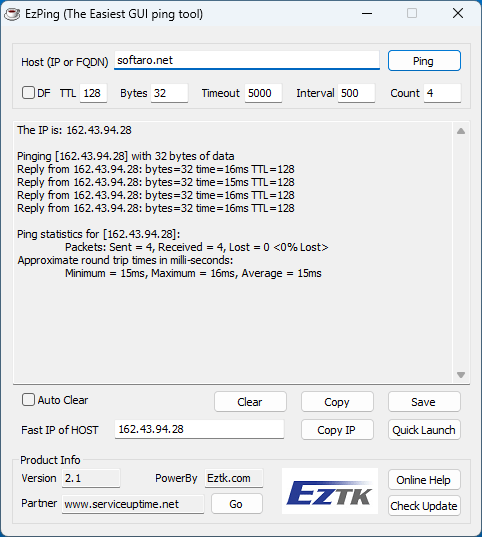
EzPing は、任意のホストまたは IP アドレスに ping を送信して、応答結果を確認することができる、Windows 向けのフリーの ping ツールです。
EzPing は、インターネット制御メッセージ プロトコル (ICMP) エコー要求パケットをターゲットホストに送信し、ICMP 応答を待機することによって動作します。Windows システムの ping ツールと同じように動作するので、優れた代替品として使用できます。
結果をログファイルに保存できます

EzPing を使用すると、DF (Don’t Fragment) フラグ、TTL (Time To Live)、タイムアウト、間隔、送信回数を好みに設定して ping を送信することができます。ping 結果はクリップボードにコピーしたり、ログファイルに保存することができます。
ドメインに複数の IP アドレスがある場合、ドメイン名の最も高速な IP アドレスを取得でき、IP アドレスをクリップボードにコピーしたり、ブラウザで直接 IP アドレスを開いたりできます。
シンプルで使いやすい ping の GUI ツール
EzPing は、Windows の「ping」コマンドを GUI で使用できるようにした便利なアプリケーションです。ネットワーク管理者は、このツールを使用して、インターネットプロトコル (IP) ネットワーク上のホストの可用性をテストし、送信元ホストから宛先コンピュータに送信されたメッセージの応答時間を測定できます。
機能
- 任意のホストまたは IP アドレスに ping を送信できます。
- DF フラグを設定/解除する
- TTL (Time To Live) を設定する
- パディングバイトを設定する
- タイムアウト、間隔、送信回数を設定する
- ドメインに複数の IP アドレスがある場合にドメインの高速 IP を取得する
- IP アドレスをクリップボードに直接コピー
- ブラウザで IP アドレスを起動する
- 出力ウィンドウをクリア、コピー、保存する
価格:無料
動作環境:Windows 7|8|8.1|10|11
使用言語:英語
最終更新日:
2年前 (2024/05/30)
ダウンロード数:333
画像

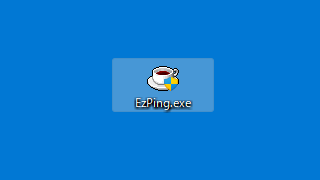
実行ファイル

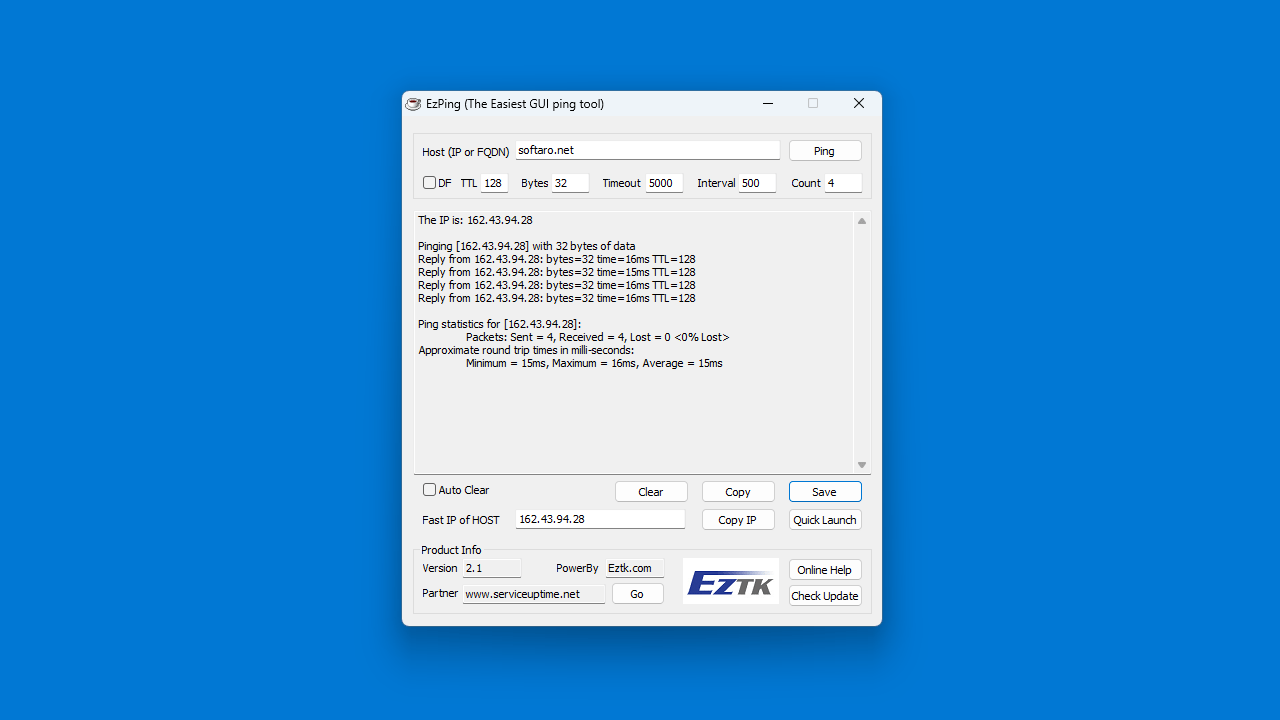
ユーザーインターフェース

ホスト / IP アドレスの入力

ping 結果
使い方
インストール
1.インストール方法
EzPing は、インストール不要で使用できるアプリケーションです。
- ダウンロードした Zip ファイルを解凍し、EXE ファイルを実行します。

基本的な使い方
1. 基本的な使い方
- ホスト名または IP アドレスを入力します。
- 必要に応じて、TTL (Time To Live)、タイムアウト、間隔、送信回数を設定します。
- [Ping]ボタンをクリックすると、送信が開始します。

- Ping の送信が完了しました。[Save]ボタンをクリックすると、結果をログファイルに保存できます。

よくある質問と回答
ライセンスについて。
EzPing は、どなたでも無料で使用できます。