").attr(n.scriptAttrs||{}).prop({charset:n.scriptCharset,src:n.url}).on("load error",i=function(e){r.remove(),i=null,e&&t("error"===e.type?404:200,e.type)}),C.head.appendChild(r[0])},abort:function(){i&&i()}}});var Jt,Kt=[],Zt=/(=)\?(?=&|$)|\?\?/;ce.ajaxSetup({jsonp:"callback",jsonpCallback:function(){var e=Kt.pop()||ce.expando+"_"+jt.guid++;return this[e]=!0,e}}),ce.ajaxPrefilter("json jsonp",function(e,t,n){var r,i,o,a=!1!==e.jsonp&&(Zt.test(e.url)?"url":"string"==typeof e.data&&0===(e.contentType||"").indexOf("application/x-www-form-urlencoded")&&Zt.test(e.data)&&"data");if(a||"jsonp"===e.dataTypes[0])return r=e.jsonpCallback=v(e.jsonpCallback)?e.jsonpCallback():e.jsonpCallback,a?e[a]=e[a].replace(Zt,"$1"+r):!1!==e.jsonp&&(e.url+=(At.test(e.url)?"&":"?")+e.jsonp+"="+r),e.converters["script json"]=function(){return o||ce.error(r+" was not called"),o[0]},e.dataTypes[0]="json",i=ie[r],ie[r]=function(){o=arguments},n.always(function(){void 0===i?ce(ie).removeProp(r):ie[r]=i,e[r]&&(e.jsonpCallback=t.jsonpCallback,Kt.push(r)),o&&v(i)&&i(o[0]),o=i=void 0}),"script"}),le.createHTMLDocument=((Jt=C.implementation.createHTMLDocument("").body).innerHTML="
",2===Jt.childNodes.length),ce.parseHTML=function(e,t,n){return"string"!=typeof e?[]:("boolean"==typeof t&&(n=t,t=!1),t||(le.createHTMLDocument?((r=(t=C.implementation.createHTMLDocument("")).createElement("base")).href=C.location.href,t.head.appendChild(r)):t=C),o=!n&&[],(i=w.exec(e))?[t.createElement(i[1])]:(i=Ae([e],t,o),o&&o.length&&ce(o).remove(),ce.merge([],i.childNodes)));var r,i,o},ce.fn.load=function(e,t,n){var r,i,o,a=this,s=e.indexOf(" ");return-1").append(ce.parseHTML(e)).find(r):e)}).always(n&&function(e,t){a.each(function(){n.apply(this,o||[e.responseText,t,e])})}),this},ce.expr.pseudos.animated=function(t){return ce.grep(ce.timers,function(e){return t===e.elem}).length},ce.offset={setOffset:function(e,t,n){var r,i,o,a,s,u,l=ce.css(e,"position"),c=ce(e),f={};"static"===l&&(e.style.position="relative"),s=c.offset(),o=ce.css(e,"top"),u=ce.css(e,"left"),("absolute"===l||"fixed"===l)&&-1<(o+u).indexOf("auto")?(a=(r=c.position()).top,i=r.left):(a=parseFloat(o)||0,i=parseFloat(u)||0),v(t)&&(t=t.call(e,n,ce.extend({},s))),null!=t.top&&(f.top=t.top-s.top+a),null!=t.left&&(f.left=t.left-s.left+i),"using"in t?t.using.call(e,f):c.css(f)}},ce.fn.extend({offset:function(t){if(arguments.length)return void 0===t?this:this.each(function(e){ce.offset.setOffset(this,t,e)});var e,n,r=this[0];return r?r.getClientRects().length?(e=r.getBoundingClientRect(),n=r.ownerDocument.defaultView,{top:e.top+n.pageYOffset,left:e.left+n.pageXOffset}):{top:0,left:0}:void 0},position:function(){if(this[0]){var e,t,n,r=this[0],i={top:0,left:0};if("fixed"===ce.css(r,"position"))t=r.getBoundingClientRect();else{t=this.offset(),n=r.ownerDocument,e=r.offsetParent||n.documentElement;while(e&&(e===n.body||e===n.documentElement)&&"static"===ce.css(e,"position"))e=e.parentNode;e&&e!==r&&1===e.nodeType&&((i=ce(e).offset()).top+=ce.css(e,"borderTopWidth",!0),i.left+=ce.css(e,"borderLeftWidth",!0))}return{top:t.top-i.top-ce.css(r,"marginTop",!0),left:t.left-i.left-ce.css(r,"marginLeft",!0)}}},offsetParent:function(){return this.map(function(){var e=this.offsetParent;while(e&&"static"===ce.css(e,"position"))e=e.offsetParent;return e||J})}}),ce.each({scrollLeft:"pageXOffset",scrollTop:"pageYOffset"},function(t,i){var o="pageYOffset"===i;ce.fn[t]=function(e){return M(this,function(e,t,n){var r;if(y(e)?r=e:9===e.nodeType&&(r=e.defaultView),void 0===n)return r?r[i]:e[t];r?r.scrollTo(o?r.pageXOffset:n,o?n:r.pageYOffset):e[t]=n},t,e,arguments.length)}}),ce.each(["top","left"],function(e,n){ce.cssHooks[n]=Ye(le.pixelPosition,function(e,t){if(t)return t=Ge(e,n),_e.test(t)?ce(e).position()[n]+"px":t})}),ce.each({Height:"height",Width:"width"},function(a,s){ce.each({padding:"inner"+a,content:s,"":"outer"+a},function(r,o){ce.fn[o]=function(e,t){var n=arguments.length&&(r||"boolean"!=typeof e),i=r||(!0===e||!0===t?"margin":"border");return M(this,function(e,t,n){var r;return y(e)?0===o.indexOf("outer")?e["inner"+a]:e.document.documentElement["client"+a]:9===e.nodeType?(r=e.documentElement,Math.max(e.body["scroll"+a],r["scroll"+a],e.body["offset"+a],r["offset"+a],r["client"+a])):void 0===n?ce.css(e,t,i):ce.style(e,t,n,i)},s,n?e:void 0,n)}})}),ce.each(["ajaxStart","ajaxStop","ajaxComplete","ajaxError","ajaxSuccess","ajaxSend"],function(e,t){ce.fn[t]=function(e){return this.on(t,e)}}),ce.fn.extend({bind:function(e,t,n){return this.on(e,null,t,n)},unbind:function(e,t){return this.off(e,null,t)},delegate:function(e,t,n,r){return this.on(t,e,n,r)},undelegate:function(e,t,n){return 1===arguments.length?this.off(e,"**"):this.off(t,e||"**",n)},hover:function(e,t){return this.on("mouseenter",e).on("mouseleave",t||e)}}),ce.each("blur focus focusin focusout resize scroll click dblclick mousedown mouseup mousemove mouseover mouseout mouseenter mouseleave change select submit keydown keypress keyup contextmenu".split(" "),function(e,n){ce.fn[n]=function(e,t){return 0
System Information Viewer (SIV) 5.86
システム情報
2020/10/15 11:462026/03/15 08:50
説明 機能 仕様 ダウンロード 画像 使い方
ハードウェアや OS、ネットワークに関する情報を表示するシステム情報表示ツール

Windows およびネットワーク、ハードウェアに関する情報を表示するフリーのシステム情報表示アプリケーション。PC のシステムやハードウェアに関する包括的なさまざまな情報を表示します。
System Information Viewer の概要
System Information Viewer は、CPU 情報、PCI 情報、PCMCIA 情報、USB 情報、SMBus 情報、SPD 情報、ACPI メソッド、マシン情報、ハードウェアセンサー、ネットワークコンピュータ、Windows オペレーティングシステム情報、ネットワーク、およびハードウェア情報を表示するための一般的な Windows ユーティリティです。
System Information Viewer の機能
System Information Viewer の主な機能です。
機能
概要
メイン機能
Windows、マシン、ハードウェアのステータス(状態)、USB バス、ネットワーク、SPD、ボリューム、ネットワークアダプタ、PCI バス などに関する情報を表示
システムに関するさまざまな情報を表示します
System Information Viewer は、CPU のクロックや温度、プロセッサのモデル、メモリ使用量、搭載されている物理メモリの形式、ネットワークアダプタ、ファン回転数… などのさまざまな情報を表示することができるシステム情報表示ツールです。
PC のハードウェアや Windows OS に関する情報を調べたい場合や、現在のハードウェアの状態(センサー値など)を知りたい場合に役に立ちます。
表示されている情報はテキストとしてコピーすることができます。
システムの完全な情報を表示するシステム情報表示ツール
System Information Viewer は、システムの完全な情報を表示するシステム情報表示ツールです。インターフェースは多少ごちゃごちゃしていますが、使い慣れると便利なユーティリティになるでしょう。
価格: 無料
動作環境: Windows 7|8|8.1|10|11
使用言語: 英語ほか
最終更新日:
1か月前 (2026/03/15)
ダウンロード数: 953
画像
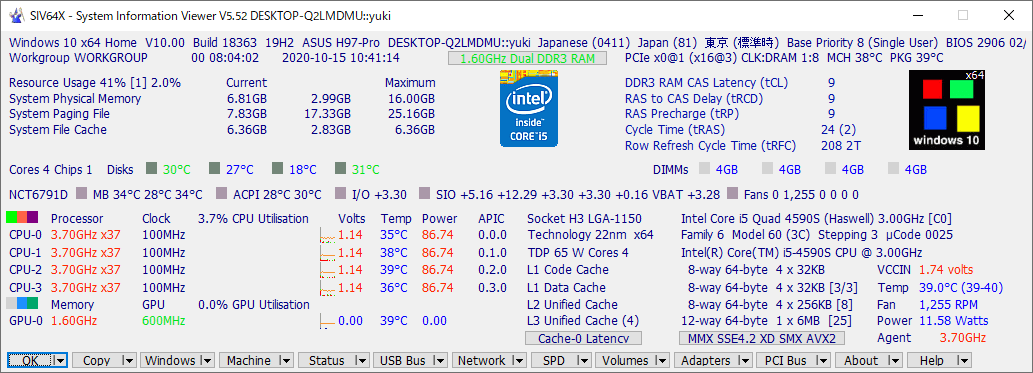
メイン画面
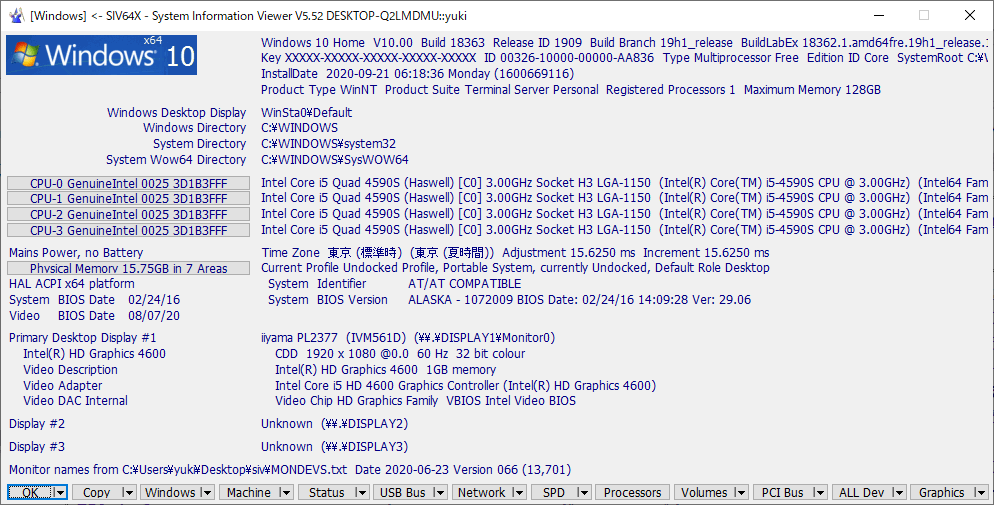
Windows 情報
使い方
インストール方法
1.インストール
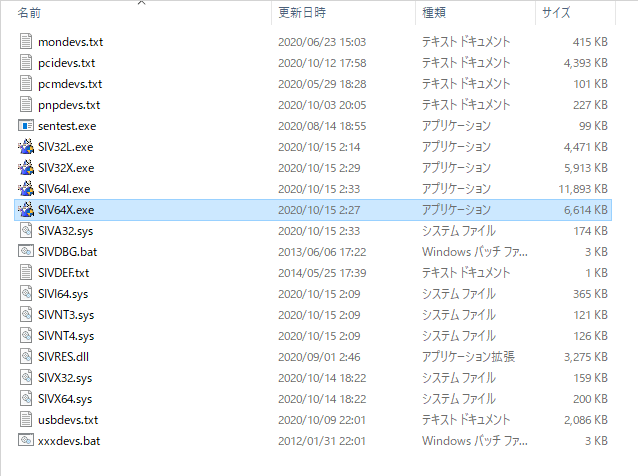
System Information Viewer はインストール不要で使用できます。EXE ファイルを実行するとアプリを起動できます。
x64 の場合は「SIV64X.exe」を実行してください。
基本的な使い方
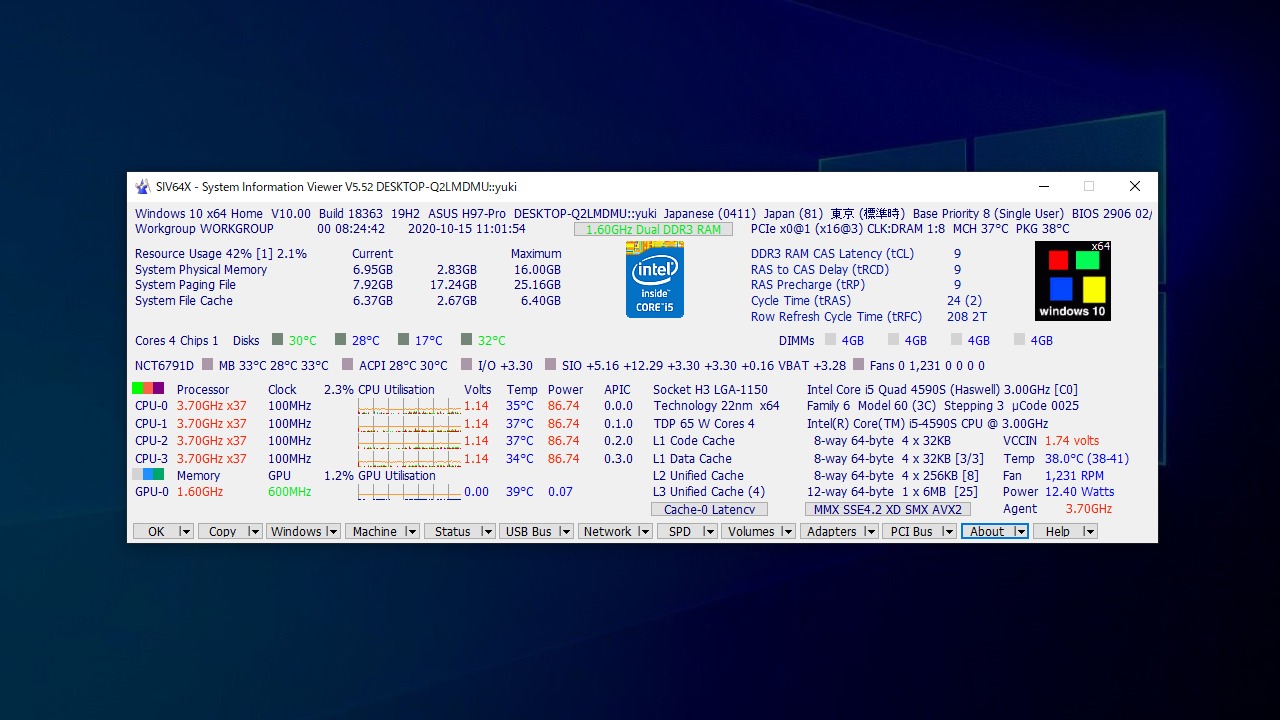
1.メイン画面
メイン画面ではシステムの概要が一覧表示されます。
画面下のボタンまたはメニュー(▼)をクリックすると、それぞれの詳細情報を表示できます。
2.Windows
「Windows 」ボタンをクリックすると、Windows に関する情報が表示されます。
3.GPU 情報
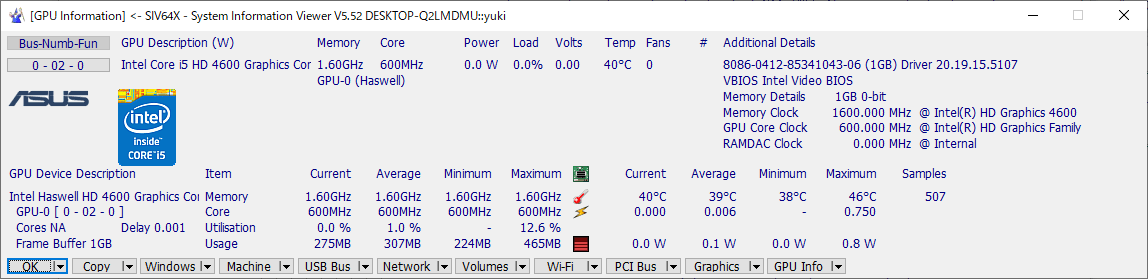
「Machine 」メニュー>「GPU Info 」を選択すると、GPU に関する情報を表示できます。
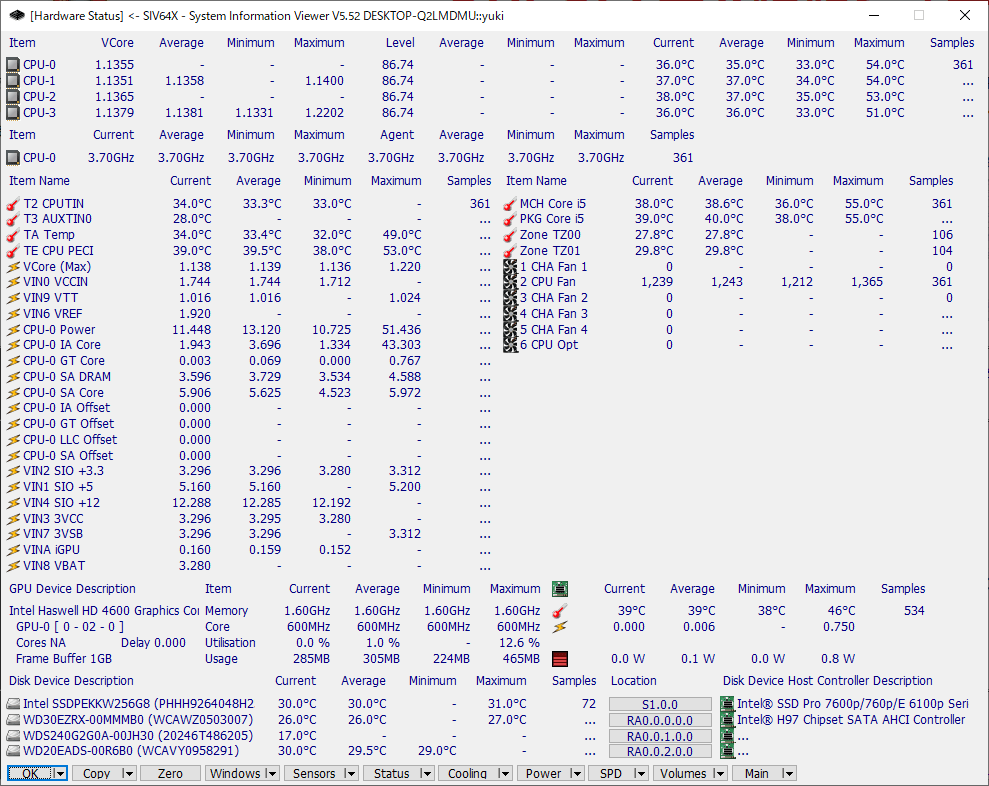
4.ハードウェアの状態
「Status 」ボタンをクリックすると、現在のハードウェアの状態が一覧表示されます。
5.メモリ情報
「SPD 」>「DIMMs 」を選択すると、搭載されているメモリおよびマザーボードの情報を確認できます。
6.ドライブ情報
「Volumes 」>「SMART Drives 」を選択すると、ハードドライブの情報を確認できます。
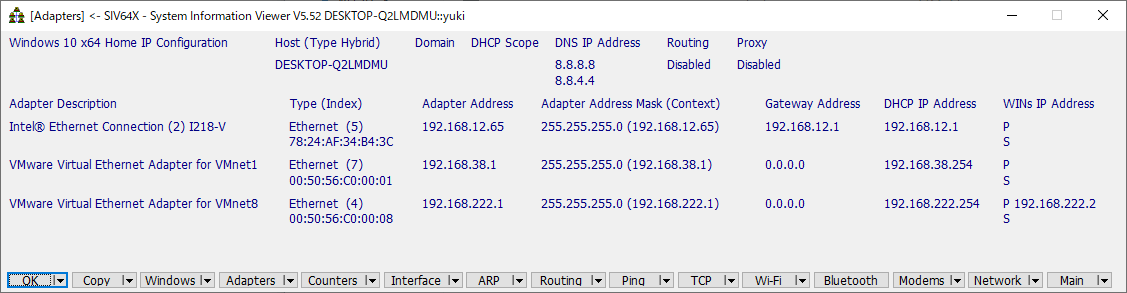
7.ネットワークアダプタ情報
「Adapters 」ボタンをクリックすると、ネットワークアダプタの情報が表示されます。
よくある質問と回答
ライセンスについて
ユーザーレビュー
レビューはまだありません、 最初のレビューを投稿してください。コメントは任意です。
System Information Viewer は非営利使用に限り無料で利用できます。商用利用したい場合は作者に連絡してください。