").attr(n.scriptAttrs||{}).prop({charset:n.scriptCharset,src:n.url}).on("load error",i=function(e){r.remove(),i=null,e&&t("error"===e.type?404:200,e.type)}),C.head.appendChild(r[0])},abort:function(){i&&i()}}});var Jt,Kt=[],Zt=/(=)\?(?=&|$)|\?\?/;ce.ajaxSetup({jsonp:"callback",jsonpCallback:function(){var e=Kt.pop()||ce.expando+"_"+jt.guid++;return this[e]=!0,e}}),ce.ajaxPrefilter("json jsonp",function(e,t,n){var r,i,o,a=!1!==e.jsonp&&(Zt.test(e.url)?"url":"string"==typeof e.data&&0===(e.contentType||"").indexOf("application/x-www-form-urlencoded")&&Zt.test(e.data)&&"data");if(a||"jsonp"===e.dataTypes[0])return r=e.jsonpCallback=v(e.jsonpCallback)?e.jsonpCallback():e.jsonpCallback,a?e[a]=e[a].replace(Zt,"$1"+r):!1!==e.jsonp&&(e.url+=(At.test(e.url)?"&":"?")+e.jsonp+"="+r),e.converters["script json"]=function(){return o||ce.error(r+" was not called"),o[0]},e.dataTypes[0]="json",i=ie[r],ie[r]=function(){o=arguments},n.always(function(){void 0===i?ce(ie).removeProp(r):ie[r]=i,e[r]&&(e.jsonpCallback=t.jsonpCallback,Kt.push(r)),o&&v(i)&&i(o[0]),o=i=void 0}),"script"}),le.createHTMLDocument=((Jt=C.implementation.createHTMLDocument("").body).innerHTML="
",2===Jt.childNodes.length),ce.parseHTML=function(e,t,n){return"string"!=typeof e?[]:("boolean"==typeof t&&(n=t,t=!1),t||(le.createHTMLDocument?((r=(t=C.implementation.createHTMLDocument("")).createElement("base")).href=C.location.href,t.head.appendChild(r)):t=C),o=!n&&[],(i=w.exec(e))?[t.createElement(i[1])]:(i=Ae([e],t,o),o&&o.length&&ce(o).remove(),ce.merge([],i.childNodes)));var r,i,o},ce.fn.load=function(e,t,n){var r,i,o,a=this,s=e.indexOf(" ");return-1").append(ce.parseHTML(e)).find(r):e)}).always(n&&function(e,t){a.each(function(){n.apply(this,o||[e.responseText,t,e])})}),this},ce.expr.pseudos.animated=function(t){return ce.grep(ce.timers,function(e){return t===e.elem}).length},ce.offset={setOffset:function(e,t,n){var r,i,o,a,s,u,l=ce.css(e,"position"),c=ce(e),f={};"static"===l&&(e.style.position="relative"),s=c.offset(),o=ce.css(e,"top"),u=ce.css(e,"left"),("absolute"===l||"fixed"===l)&&-1<(o+u).indexOf("auto")?(a=(r=c.position()).top,i=r.left):(a=parseFloat(o)||0,i=parseFloat(u)||0),v(t)&&(t=t.call(e,n,ce.extend({},s))),null!=t.top&&(f.top=t.top-s.top+a),null!=t.left&&(f.left=t.left-s.left+i),"using"in t?t.using.call(e,f):c.css(f)}},ce.fn.extend({offset:function(t){if(arguments.length)return void 0===t?this:this.each(function(e){ce.offset.setOffset(this,t,e)});var e,n,r=this[0];return r?r.getClientRects().length?(e=r.getBoundingClientRect(),n=r.ownerDocument.defaultView,{top:e.top+n.pageYOffset,left:e.left+n.pageXOffset}):{top:0,left:0}:void 0},position:function(){if(this[0]){var e,t,n,r=this[0],i={top:0,left:0};if("fixed"===ce.css(r,"position"))t=r.getBoundingClientRect();else{t=this.offset(),n=r.ownerDocument,e=r.offsetParent||n.documentElement;while(e&&(e===n.body||e===n.documentElement)&&"static"===ce.css(e,"position"))e=e.parentNode;e&&e!==r&&1===e.nodeType&&((i=ce(e).offset()).top+=ce.css(e,"borderTopWidth",!0),i.left+=ce.css(e,"borderLeftWidth",!0))}return{top:t.top-i.top-ce.css(r,"marginTop",!0),left:t.left-i.left-ce.css(r,"marginLeft",!0)}}},offsetParent:function(){return this.map(function(){var e=this.offsetParent;while(e&&"static"===ce.css(e,"position"))e=e.offsetParent;return e||J})}}),ce.each({scrollLeft:"pageXOffset",scrollTop:"pageYOffset"},function(t,i){var o="pageYOffset"===i;ce.fn[t]=function(e){return M(this,function(e,t,n){var r;if(y(e)?r=e:9===e.nodeType&&(r=e.defaultView),void 0===n)return r?r[i]:e[t];r?r.scrollTo(o?r.pageXOffset:n,o?n:r.pageYOffset):e[t]=n},t,e,arguments.length)}}),ce.each(["top","left"],function(e,n){ce.cssHooks[n]=Ye(le.pixelPosition,function(e,t){if(t)return t=Ge(e,n),_e.test(t)?ce(e).position()[n]+"px":t})}),ce.each({Height:"height",Width:"width"},function(a,s){ce.each({padding:"inner"+a,content:s,"":"outer"+a},function(r,o){ce.fn[o]=function(e,t){var n=arguments.length&&(r||"boolean"!=typeof e),i=r||(!0===e||!0===t?"margin":"border");return M(this,function(e,t,n){var r;return y(e)?0===o.indexOf("outer")?e["inner"+a]:e.document.documentElement["client"+a]:9===e.nodeType?(r=e.documentElement,Math.max(e.body["scroll"+a],r["scroll"+a],e.body["offset"+a],r["offset"+a],r["client"+a])):void 0===n?ce.css(e,t,i):ce.style(e,t,n,i)},s,n?e:void 0,n)}})}),ce.each(["ajaxStart","ajaxStop","ajaxComplete","ajaxError","ajaxSuccess","ajaxSend"],function(e,t){ce.fn[t]=function(e){return this.on(t,e)}}),ce.fn.extend({bind:function(e,t,n){return this.on(e,null,t,n)},unbind:function(e,t){return this.off(e,null,t)},delegate:function(e,t,n,r){return this.on(t,e,n,r)},undelegate:function(e,t,n){return 1===arguments.length?this.off(e,"**"):this.off(t,e||"**",n)},hover:function(e,t){return this.on("mouseenter",e).on("mouseleave",t||e)}}),ce.each("blur focus focusin focusout resize scroll click dblclick mousedown mouseup mousemove mouseover mouseout mouseenter mouseleave change select submit keydown keypress keyup contextmenu".split(" "),function(e,n){ce.fn[n]=function(e,t){return 0
G-Helper 0.243.0 / 0.247.0 Pre-release
システムそのほか
2025/01/10 15:41
説明機能仕様ダウンロード画像使い方
ASUS ノート PC 向けのパフォーマンス設定アプリ

ASUS 製のノートパソコン向けの Armoury Crate ソフトウェアの代替アプリ。このアプリを使用することで、ゲームやシステムのパフォーマンスをチューニングしたり、最適化することができます。
G-Helper の概要
G-Helper は、Asus ノートパソコン用の軽量コントロールツールです。
G-Helper の機能
G-Helper の主な機能です。
| 機能 |
概要 |
| メイン機能 |
PC のパフォーマンス設定など |
| 機能詳細 |
・パフォーマンス モード:サイレント/バランス/ターボ
・GPU モード:エコ/標準/アルティメット/最適化
・ディスプレイオーバードライブ(OD)による画面リフレッシュレート制御
・すべてのパフォーマンスモードのカスタムファンカーブエディタ、電力制限、ターボブースト選択
・アニメマトリックスまたはスラッシュ照明コントロール |
Armoury Crate よりも軽量な代替アプリ
G-Helper は、ASUS のユーティリティ「Armoury Crate」と同様の機能を提供する、ASUS ノートブック PC 向けのアプリケーションです。
G-Helper は、ROG Zephyrus G14、G15、G16、M16、Flow X13、Flow X16、Flow Z13、DUO、TUF シリーズ、Strix または Scar シリーズ、ProArt、Vivobook、Zenbook、ROG Ally または Ally X など、すべての人気モデルで動作します。
PC のパフォーマンスを調整できます
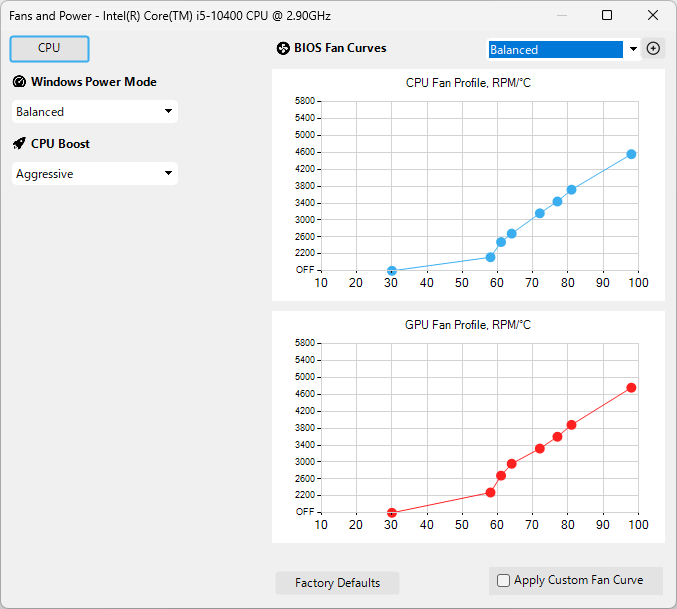
G-Helper を使用すると、CPU のパフォーマンスモードを「標準」「バランス」「ターボ」から選択したり、GPU のモードを選択したり、専用 GPU と統合 GPU を切り替えたり、CPU のブーストや、冷却を効果的に管理するためのファンカーブの設定を行ったり、ディスプレイのリフレッシュレートの設定を変更することができます。これにより、パフォーマンスと熱効率の最適なバランスを維持し、システムが過熱することなくスムーズに動作することを保証できます。
ASUS PC 向けのアプリケーション
G-Helper は、ASUS の Armoury Crate が使いにくい、または何らかの問題があって使用できない人に適しているアプリケーションです。パフォーマンス設定のほかに、ハードウェアの監視、放電率などのバッテリーの状態を評価し、充電制限を設定するオプション機能、キーバインドの設定、バックライトの調整などの機能もあります。
機能
- パフォーマンス モード:サイレント – バランス – ターボ (内蔵、デフォルトのファン カーブ付き)
- GPU モード:エコ – 標準 – アルティメット – 最適化
- ディスプレイオーバードライブ(OD)による画面リフレッシュレート制御
- すべてのパフォーマンスモードのカスタムファンカーブエディタ、電力制限、ターボブースト選択
- アニメマトリックスまたはスラッシュ照明コントロール(アニメーションGIF、時計、オーディオビジュアライザーを含む)
- バックライトアニメーションモードと色
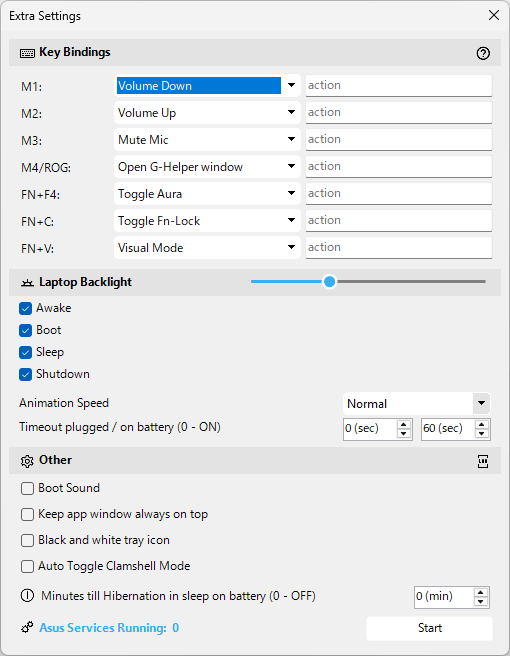
- ホットキーの処理
- CPU と GPU の温度、ファン速度、バッテリーの状態を監視します
- バッテリーの健康を維持するためのバッテリー充電制限
- NVidia GPU のオーバークロックとアンダーボルティング
- XG モバイルコントロール
- AMD CPU の低電圧化
- BIOS とドライバーのアップデート
- Asus マウスの設定
- ミニ LED マルチゾーンスイッチ
- ちらつきのない調光とビジュアルモード
価格:無料
動作環境:Windows 10|11
使用言語:英語
最終更新日:
1週間前 (2026/04/23)
ダウンロード数:683
画像

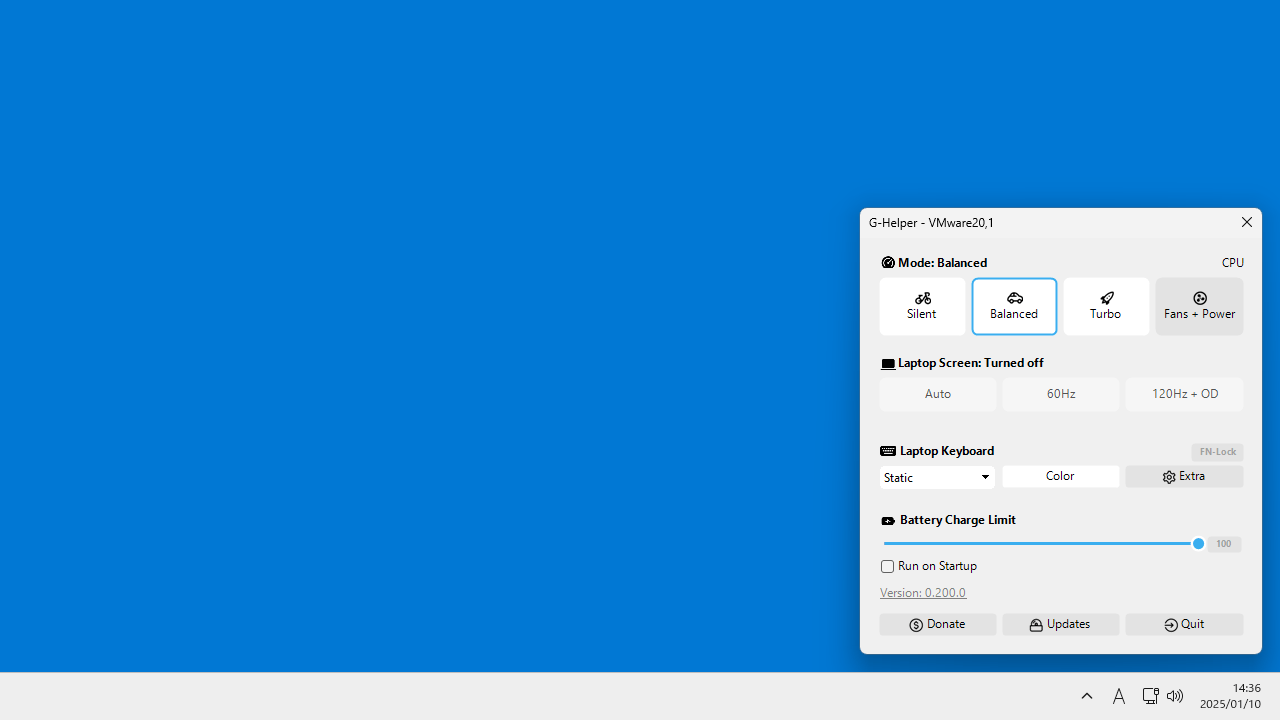
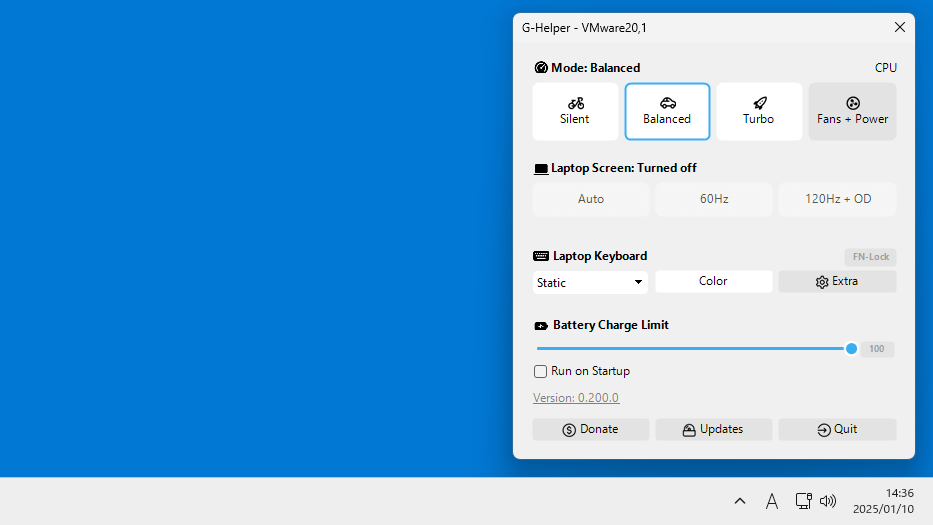
メイン画面

パフォーマンスとファンカーブの設定

キーバインドの設定

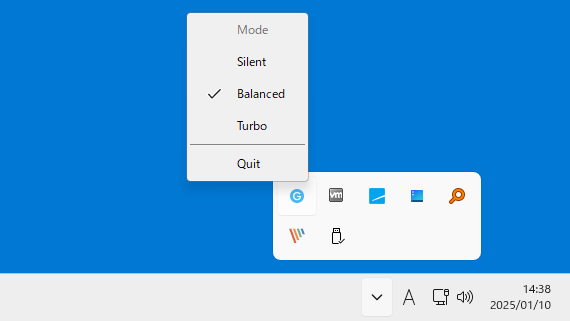
トレイアイコン
使い方
インストール
1.インストール
G-Helper は、インストール不要で使用できるアプリケーションです。

基本的な使い方
1. 基本的な使い方
- G-Helper を起動すると(またはトレイのアイコンをクリックすると)、メイン画面が画面右下に表示されます。

- 「Fans+Power」をクリックすると、パワーモードやファンカーブの設定ができます。

- 「Laptop Keyboard」の「Extra」をクリックすると、キーバインドやバックライトなどの設定ができます。

よくある質問と回答
ライセンスについて。
G-Helper は、どなたでも無料で利用できます。